- /
- /
- /
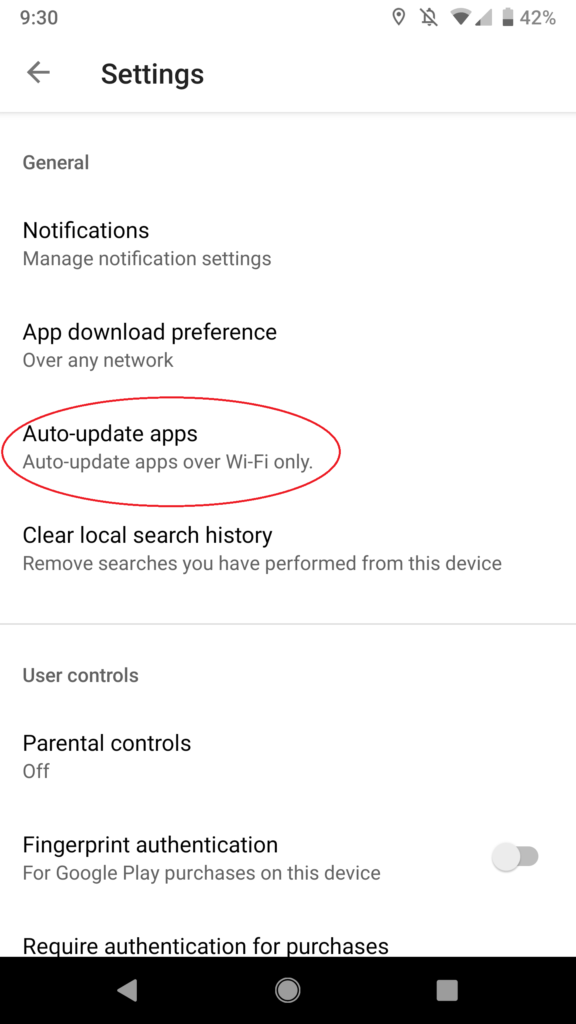
How can I have the latest LifeSaver version on my Android?
By turning on auto-update in your Google Play Store settings, you will always have the most updated version of LifeSaver on your Android phone.
Steps:
- Open up Google Play on the phone.
- Click on the top right menu icon (Step_2.png)
- Click on the Settings option (Step_3.png)
- Click on Auto-update apps and select to download over Wifi (Step_4.png)



Quick Links
Newsletter
Subscribe to the LifeSaver Ledger to receive the latest industry, technology, and safety news.
© Life Apps LLC, LifeSaver logo and design are trademarks of Life Apps LLC.
This site is protected by reCAPTCHA and the Google Privacy Policy and Terms of Service apply.